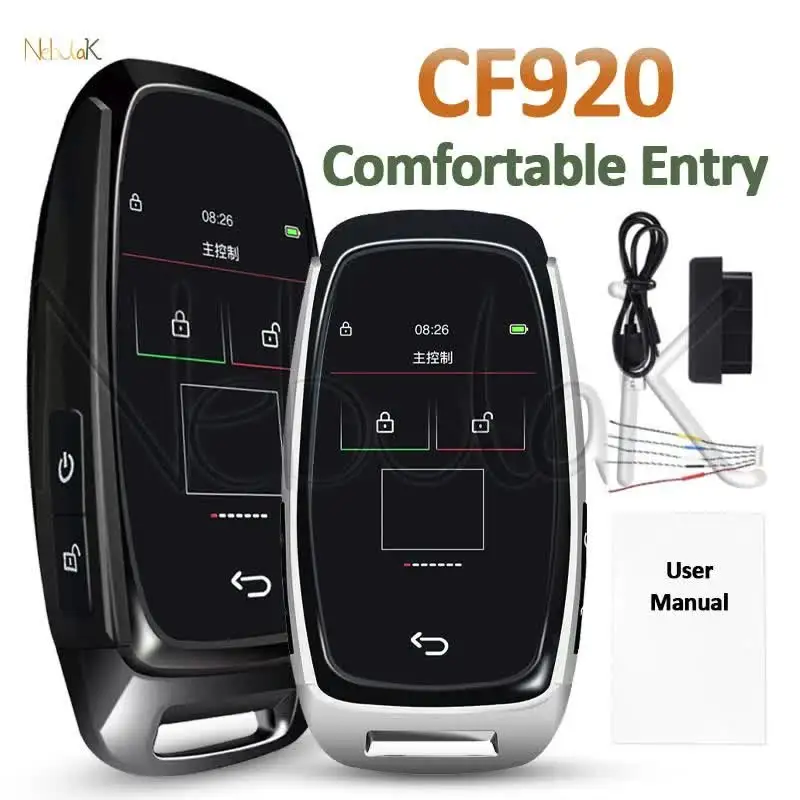


CF920 Universal Remote Display Smart LCD Key Comfortable Entry For Audi/BMW/Ford/Mazda/Toyota Keyless Car Digital Touch Screen
For all keyless start or push button start cars.
Is not suitable for all manual direct plug car keys. (If your car has lock you can't use smart lcd key, even you can start the car without plugging it in or put it in your pocket, you still can't use smart lcd key.)
Need to Solder the original car key circuit board for upgrade and modification.
Specification:
Supported languages: English, Korean, Chinese……
Functions:
1.Cool Appearance
2.Vehicle-level Comfortable Entry
3.HD anti-glare LCD screen
4.Lock the car window
5.Window lift (some models)
6.Full laminated glass touch
7.Alloy material
8.Color (optional): black, silver
9.15 minutes quick installation
10.With OBD installation
11.Long standby time
12.Anti-lost function, fill in the owner information
What is the difference between Keyless Entry and Comfortable Entry?
Keyless Entry:
The original car has a keyless entry function, and you need to press the button on the handle to unlock the lock.
Comfortable Entry:
Contactless, automatic unlocking within 1.5 meters near the vehicle, automatic locking more than 5 meters away.
(need to plug OBD plug)
Important note:
1.100% brand new and high quality modified key shell with LCD screen.
2.Solder by yourself (requires some hands-on ability) or find a professional locksmith to solder the circuit board
3.LCD key functions: unlock, lock, switch the tail box, multifunction button.
4.Does not support mobile APP key, with comfortable entry function(need set obd part).
5.Suitable for all original cars with one-key start function, not suitable for all manual direct-plug car keys.
6.Please confirm whether your car have the keyless start/stop engine buttons function before purchasing
(if your car have keyhole can't use smart lcd key, even if you can start the car without plugging it in or putting it in your pocket, you still can't use smart lcd key).
7.When charging the LCD key, please use a common charging head to charge, do not use a fast charging head to charge, as using a fast charging head may damage the battery life.
8.Some car model is relatively old, you need two keys to use the LCD key, one key is welded to the LCD key, the other key needs to be inserted into the keyhole, and keep the second key in the car. otherwise only use one key The key might not start the car engine.
If you are unsure, you can send us a photo of your original key to confirm if it is suitable for your car.
Non-destructive installation:
During assembly, you only need to take out the original PCB board and solder the wires with each button, then put behind the LCD key, after using the LCD key.
If you don't want to use our key, you can remove all wires and put it in your original key box. This allows a non-destructive installation.
How is it installed?
Need to Solder the original car key circuit board for upgrade and modification.
If you have a welding tool, you can complete the welding step by step according to the instructions, which can be completed in about 5 minutes.
If you don't have welding tools, you can go to the local locksmith to check, and then install the instructions to complete the welding.
1. Please prepare an original remote control key.
2. Open the remote key, take out the circuit board.
3. Take out the wiring harness and connect them correctly according to the color of the rubber ring.
4. Solder the corresponding wiring harness on the circuit board battery position. The red wire is positive (+), the black wire is negative (–).
5. Weld the wiring harness-unlock,lock,trunk and multifunction correspondingly on the original key circuit board. Pls note welding on the button foot and no need to seperate the positive and negative.
6. Plug the wiring harness with welded circuit board in right direction into LCD key.
7. Padded with sponge under the welded circuit board.
8. Close the LCD key and fix it with screws.
9. You need to make sure the circuit board chip is facing out, avoid blocking the received signal. Otherwise, the comfortable input function will be affected.
Product List:
1X LCD Key
1X Wiring Harness
1X Charging Cable
1X OBD
1X Manual
1X Packing Box