

BQCC 2 Din 9 Inch Universal MP5 Car Radio FM AM RDS Mirror Link Bluetooth Wired Wireless CarPlay Android Auto Multimedia Player
Welcome to my store! Have a good shopping time!
Loving life, and love shopping.
100% brand new and high quality.

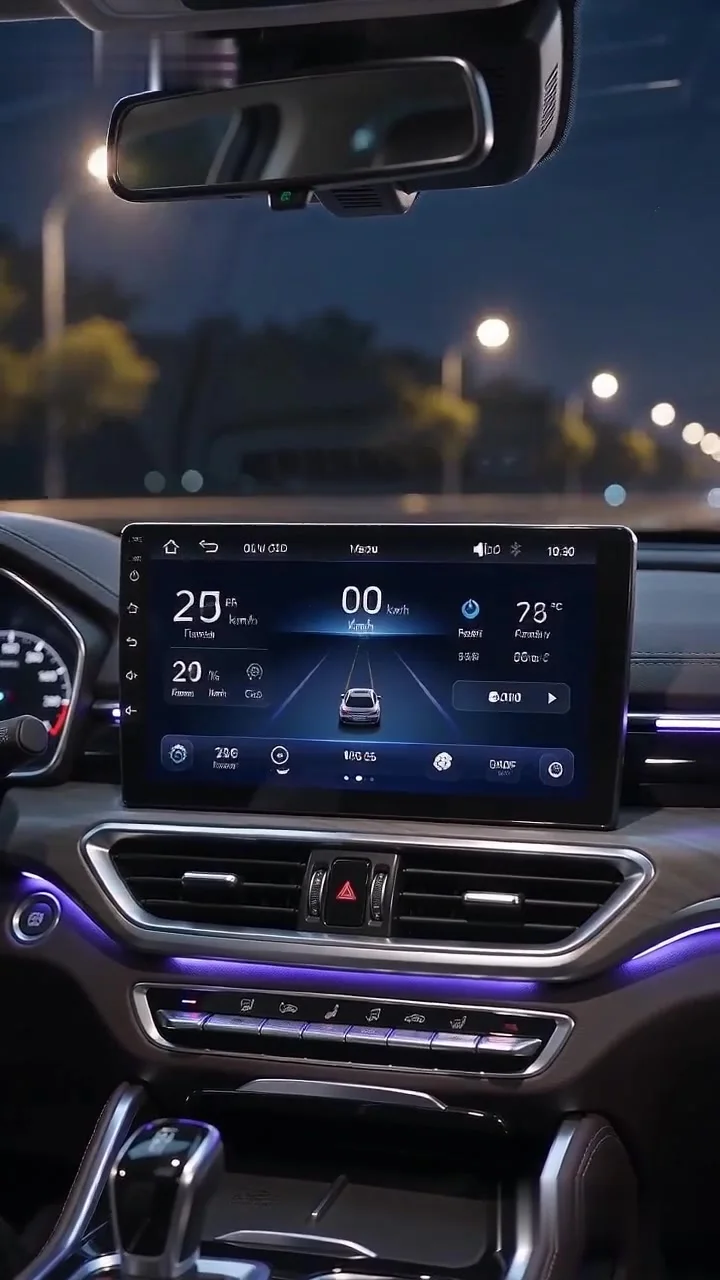
✨ Equipped with a 9‑inch IPS large display at 1024×600 resolution, delivering a bigger viewing area than 7‑inch stereos for clearer navigation routes and video playback. The IPS panel boasts wide viewing angles and anti‑glare performance, preventing color distortion under strong sunlight; minimalist white key backlight fits interior styling across different car models.
✨Reliable F133 chipset paired with Allwinner melis OS (128M RAM) minimizes playback stutter and hardware failure. Rated for 12‑14.4V automotive power input to absorb voltage spikes during engine startup, steady operation is guaranteed between -10℃~60℃ for hot tropical and frigid cold climates.
✨Native wired + wireless Apple CarPlay & Android Auto support, alongside dual‑mode screen mirroring for iOS and Android devices. 2.4G/5G dual‑band WiFi optimizes wireless linkage latency to reduce unexpected disconnections during GPS navigation and streaming audio playback.
✨Bluetooth 5.0 (default device name: SWL‑BT) powers hands‑free calling & wireless music streaming. An optional external microphone port suppresses road wind/tyre noise for crisp in‑car voice calls.
✨High‑sensitivity C9636 tuner covers FM 87.5‑108.0MHz & AM 522‑1620KHz, with switchable regional presets for China, dual American markets, Japan, Russia, Middle East, Europe, Brazil, Australia and Eastern Europe (rare Australia band support for broad global compatibility). Built‑in RDS parses live traffic notifications and station metadata for overseas daily commutes.
✨CD7388CZ amplifier outputs 60W×4 peak speaker power; a dedicated RCA subwoofer port enables aftermarket bass upgrades. Full RCA expansion ports (2CH audio in/out, 1CH video input & output) support connection to external amplifiers and secondary displays.
✨Dual rear USB ports (4P & 6P connectors) support USB media playback and external USB dash cams. Reverse camera input works with CVBS analog feeds & AHD high‑definition signals for automatic parking preview when reverse gear is engaged. Programmable steering wheel key learning adapts stock steering controls on universal vehicle fitments for distraction‑free media adjustment.
✨Extensive media codec support covers lossless APE audio, mainstream video containers (MKV, MP4, AVI) and common picture file types. The UI ships with 20+ global languages (including Indonesian, Thai, Ukrainian) to remove language barriers for Southeast Asian and Eastern European shoppers.
✨All installation consumables come pre‑packed: 16P power harness, extended USB cables, reverse video wire, RCA cords, mounting brackets & locking screws, no extra aftermarket hardware purchase required for regular retrofit jobs.


Basic parameters
Model F9090W
Type In-car MP5 Player
System Allwinner Melis System
Software Solution F133
Radio Frequency Default European frequencies: FM 87.5–108.0 MHz, AM 522–1620 kHz
(Switchable to frequencies for China, Americas 1, Americas 2, Japan, Russia, Middle East, Europe, Brazil, Australia, and Eastern Europe)
Radio IC C9636
Amplifier IC CD7388CZ
Output Power 60W x 4
Operating Voltage 12–14.4V
Operating Temperature -10 to 60°C
Bluetooth Version 5.0 (Default name: SWL-BT)
Wi-Fi Frequency 2.4G/5G Dual-band (used for CarPlay and Android Auto connections)
Panel Lighting White light
Performance Parameters
CPU F133
RAM 128MB
Display Resolution 1024×600
Screen Size 9-inch IPS display
Dimensions
Front panel dimensions Top width: 227mm; Bottom width: 219mm; Height: 130mm
Main unit depth 42mm
Color box dimensions 290 x 185 x 100mm
Carton dimensions 595 x 390 x 325mm
Units per carton 12 units
Weight Parameters
Weight per unit 1.12 kg
Net weight per carton 13.44 kg
Gross weight per carton 14.64 kg
Function Parameters
Smartphone Connectivity “Supported: √, Not Supported: ×
Apple CarPlay: Wired √, Wireless √;
Android Auto: Wired √, Wireless √;
iPhone Screen Mirroring: Wired √, Wireless √;
Android Screen Mirroring: Wired √, Wireless √.”
Reversing Camera Supported (CVBS/AHD)
Video Playback Warning Supported
Steering Wheel Controls Supports button learning
Video Input Supported
Video Output Supported
Dash Cam Supported (Supports external USB dash cam)
USB Ports Two rear USB ports (4-pin, 6-pin)
AM Supported
RDS Supported
Reset Button Supported
RCA Port Parameters
Audio Output 2 channels (Left + Right)
Audio Input 2 channels (Left + Right)
Video Output 1 channel
Video Input 1 channel
Subwoofer Output 1 channel
Reversing Camera Input 1 channel
External Rear Microphone Input Supported (optional)
Format Parameters
Audio Formats: MP3/AAC/APE/OGG/M4A/RA/WAV
Video Formats: H263/H264/H265/DIVX HD/AVI/FLV/MKV/MPEG/MP4/WMV9/VC/ASF/TS/QT
Image Formats: JPEG/PNG/BMP/GIF/TIFF
Language Parameters
English/Chinese/French/German/Arabic/Italian/Japanese/Portuguese/Russian/Spanish/Hebrew/Polish/Turkish/Czech/Korean/Indonesian/Thai/Ukrainian/Greek/Dutch
Other Parameters
Factory Default Password: 888888
Basic Functions
1. Radio (FM/AM)
2. USB drive playback (audio/video/images)
3. Video input and output functions
4. Bluetooth functionality
5. RCA audio output (supports subwoofer connection)
6. Rear-view camera support (supports CVBS and AHD cameras; camera optional)
7. Steering wheel control learning function
8. Wired & wireless phone connectivity (Android Auto and Apple CarPlay)
9. RDS function
10. Subwoofer output
FAQ:
Q1.Why the car radio can't turn on?
1>Please check the Voltage of the car radio: DC 12V
2>When you test this car radio, you can combine the red and yellow wires and connect them to the positive side of the power supply. The black line to the negative power supply.
3>Replace the same type of insurance to test the car radio.
Note: Please must use our power cables to connect our car radio, it is not possible to insert the original car plug directly into our machine.
Q2.Why the car radio will show time after we turn off this?
>That time clock is a function for the car radio, that can't be removed. In fact, a car radio had been turning off, saves time is more convenient for people to see,
>If you didn't need this, you need to unplug the power positively and negatively
Q3.Why hasn't sound in the car radio when playing music?
>1. When you are not using our original audio cable, please check if your audio cable is suitable for our camera.
>2. Please check if there is any collision between the lines.
>If the line is connected, there will be no sound when the speaker cable touches the speaker cable. There is also no sound when the power cord touches the speaker cable.
>If the problem is still here, please use a single speaker to connect a group of audio cables to test the car radio. The four-speaker cables are connected separately to see if there is any sound.
Q4.Why can't search FM?
>1. No radio antenna was inserted.
>2. Please check if the radio antenna is plugged in. Please insert more antennas several times to make it well contacted.
>3. The signal of your location is not good. Please go to a better place to test again.
>4. The radio antenna on the car is broken/has no effect; please replace the radio antenna and test it again.
Q5.Why can't connect the Bluetooth to the car radio?
>1. Open the phone settings interface, open the Bluetooth in the Bluetooth function, search for Bluetooth devices, and find the player's Bluetooth model to be paired; if you need a pairing code, enter 0000; if not, try 1234 or 123456.
>2. Please try to use another mobile phone to test this function. All methods are correct and still cannot use Bluetooth, Please unplug the plug on the back of the player and plug it in after 3 minutes.
Q6. How to update GPS Map?
>1. First of all, you need to download the map update APK from our website or anywhere else, or use a mobile phone to do WIFI hotspots to download and install directly. You can also use online navigation. Then you need to copy them to the GPS ROM and set the navigation path to the navigation program by setting.
Q7.Is it possible to listen to music or radio while using navigation ?!
>1. Yes, it is possible to listen to the radio or music while using the navigation system. Clayton devices are using a unique technology that makes listening to music happen when you are using the navigation system.
Q8.Do these units support steering wheel control ?!
>1.Yes of course. For each different car model, there is a different CAN-Bus ( Optional ) that comes with the unit to match the unit to the vehicle amplifier and steering wheel control.
Q9.Can we install the DVD Units ourselves?
>1. We will provide all the wires for the navigation, Power wire (Plug and play), RCA wires (with 7 ports), Reversing video input wire & wifi & Bluetooth antenna, GPS antenna, two USB wires
>2. It is preferred that the installation be done by a professional person. We are not responsible for the damages that might occur to the dashboard of the car while installing the device. So it is better that a professional person installs the unit on the cars.